> This is part 1 of 5 of the full documentation (pages 1–100 of 439).
> The content is paginated: fetch every part to see all of it.
> Next part: https://docs.arkannis.net/llms-full.txt/1
> Page index: https://docs.arkannis.net/llms.txt
# Welcome!
## Welcome aboard!
Welcome to my IT Documentation page.
Over the years I have gathered different tips and guides on different IT topics.
I have decided that I do not want to keep these topics in my own "Stash" and want to share them with the world.
They span across a various areas as I am a technology enthusiast.
The scope of sharing the documentation is so that others can gain easy what I have sunk hundreds of hours in.
If someone saves hours of reading, testing and implementing by reading one of these guides then mission accomplished.
Enjoy! :tada:
## Contact & Info:
* [LinkedIn](https://www.linkedin.com/in/cristian-m-464488165/)
# SCRUM
# Workflow
### Overview of workflow and mentality:
* We are doing just enough planning to get moving
* Each cycle takes 1-3 weeks (Also called sprint)
* Then you repeat the whole process again

#### Product Backlog:
* Is where product owners create a prioritized list of features called user stories
#### User stories:
* User stories goes with the following format
```
As a....
I need...
So that...
```
* Example:
```
As a user
I need a 2FA setup
So that I am able to log in securely
```
### Full format:

# DevOps
The initial documentation has been based on FreeCodeCamp's Course:
# What is DevOps?
### What is DevOps?
* Methodology asking users for feedback with CI/CD
#### Sections
* Planning - how to build the app
* Coding - building the features
* Building - get the version done (for different OS, etc)
* Testing - Test these versions (Automation or Manual Testing)
* Release - releasing the app (usually blue - green deployment is done here)
* Deploy - via CI/CD to release on the internet
* Operate - scaling, adding more resources for the load, etc
* Monitoring - See if any issues arise, see if everything works fine
* After all the feedback, back to the planning stage & DO IT AGAIN
### What is DevOps Engineering?
* Practical use of DevOps within software engineering teams. Being able to build, test, release and monitor applications
### DevOps Engineering Pillars:
* Pull Request automation
* Deployment automation
* Application performance automation
#### Pull Request automation
* Developers share code changes using git tools like Github, Gitlab, Bitbucket
* A set of code changes in git tools is called a pull request or a merge request
* Inf pull requests are approved, the code changes can go into the main codebase
#### Deployment automation
* Deploy a feature to a certain set of users as a final test before rolling it out (canary deployment)
* Starting new versions of services without causing downtime (blue-green deployment)
* Rolling back to the prior version in case something goes wrong
# What is TDD? (Test Driven Development)
#### The tests are written before the code itself
#### TDD Goals
* Know when something breaks and where
* Know that the whole system works correctly
#### Workflow:
1. Chose something to work on
2. Build it based on specifications
3. Test it with small scripts
#### Workflow WITH TDD:
1. Chose something to work on
2. Write tests that would pass if products work
3. Keep building until all tests pass
{% hint style="info" %}
**The results are the same regardless of method - TDD forces you to prioritize tasks**
{% endhint %}
# What is CI? (Continuous Integration)
* Developers pushing many small changes to a central GIT repo per day.
* These changes are verified by an automatic software that runs comprehensive tests to ensure no major issues are seen by the customer
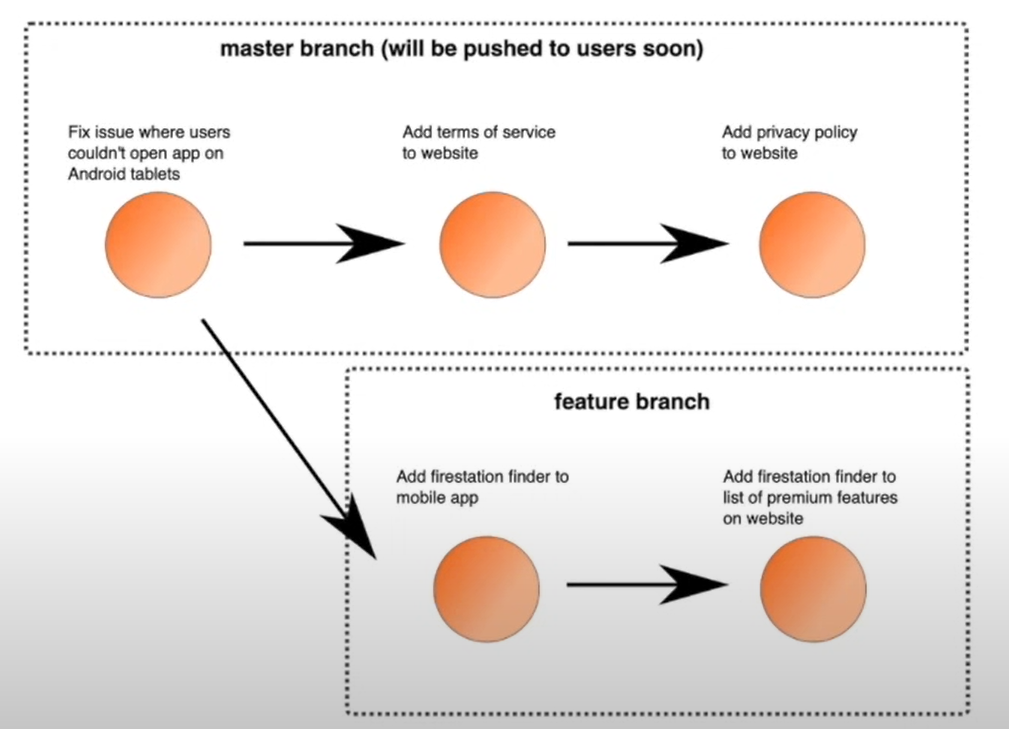
#### Branch based development process
{% hint style="info" %}
CI is a vital tool for developer collaboration. It really should be one of the first things that should be automated.
* Prevents errors and increase user satisfaction
{% endhint %}
# What is code coverage?
**Methodology** that quantitatively measures how comprehensive a code base's tests are.
Increasing code coverage often increases stability and reduces bugs.
#### Formula:
* Total number of non-syntax lines with tests / total number of non-syntax lines
#### When to care about code coverage?
* Your product has users and those users might leave if they are affected by bugs
* You are working with developers that aren't immediately trustworthy like contractors/interns
* You are working on a very large code base with many testable components
{% hint style="warning" %}
**Common mistake - too many tests for uncertain features**
{% endhint %}
# Linting best practices
* **Linters look at a program's soruce code and find problems automatically.**
* **They are a common feature of pull request automations because they ensure that "obvious" bugs do not make it to PROD**
{% hint style="info" %}
It's usually a good idea to follow a style guide to avoid resentment within engineering teams
One such example is the [Google Style Guide](https://google.github.io/styleguide/) - which is open source
{% endhint %}
### The NIT approach
* Code reviewers leave little comments on the code called "nits" that the team can ignore until broader reviews.
* Nits are helpful as future references but prevent blocking important changes
### Auto Formatter
* Tools that help apply code style rules based on the style guide your team has chosen automatically
#### Example for GO:
```bash
find . -name '.go' -not -path "/vendor/*" -exec gofmt -s -w {} ;
```
### Linting automatically in CI
* Developers should never wait for a human reviewer to let them know if their code is linted and styled correctly
* Cheap and convenient to run linting and formatting within CI steps
{% hint style="info" %}
It's a good idea to make LINT be another unit test within your CI
{% endhint %}
* Even better solution in CI:
{% hint style="info" %}
Automatically fix the issues too
{% endhint %}
```docker
COPY . .
RUN if ! npm run eslint; then \
npm run eslint --fix && \
git config user.name 'lint bot' && \
git config user.email 'lint@bot.com' && \
git add -A &&
git commit -m 'Automatically linted' && \
git checkout -b $(git branch --show-current)-linted && \
git push -f origin $(git branch --show-current)-linted; && \
echo 'line failed!'; exit 1; \
fi
```
#### Examples of linters:
{% hint style="info" %}
Python: pylint, flake8
GO: gofmt
SonarQube - used for a lot of languages - Static analisis (looking at source code without running it)
DeepSource - used for a lot of languadges + Terraform
{% endhint %}
DeepSource pricing can be found here:
Any team with more than one developer working in the same codebase should setup a linter to catch obvious bugs
# Ephemeral Environments
* Temporary deployments that have self-contained versions of your application, generally every feature branch
### How do databases work in ephemeral environments?
* Prepopulated data - it contains representative, anonymized data - to pass security audits, all Personally-Identifiable Information must be scrubbed from databases to be used in such envs
* Undoable - if data is deleted or modified, it should be easy to reset the database to its original state
* Migrated - Database uses the schema currently used in PROD and has proposed migrations run against it
* On of the most common cases of problems uncovered by ephemeral environments are broken or non-preformat database migrations
### Ephemeral environments lifecycle management:
* Option A: tie the lifecycle to the life of a pull request or merge request
* Option B: Create a ChatOps bot that allows creating a new environment for a specific branch with a small timeout
* Option C: Create an ephemeral environment for every commit, and hibernate them the second they are provisioned, then wake them up as they are required
### DYI ephemeral environments:
* Budget 6-12 months of engineering time for setup, then dedicated person for managing these envs
* Will need clould service provider
* Create slackbot that responds to `/env-create-for-mybrach `
# Rolling Deployments
* Strategy to deploy a new version of an application without causing downtime.
* They work by creating a single instance of the new version of an application, then shutting off one instance of the old version until all instances have been upgraded
{% hint style="success" %}
How to:
1. Create an instance of the new version of the backend
2. Wait until new copy is up ("healthy")
3. Delete an instance of the old version of the backend
4. If any instances of the old version still exist, go back to step 1
{% endhint %}
#### Benefits:
* Well supported
* No huge bursts
* Easily reverted
#### Cons:
* Speed (can be slow to run)
* API compatibility (Usually can be mitigated by making APIs backwards compatible)
Rolling deployments are relatively simple to understand, and generally well supported by orchestrators. If your users mind when you have downtime, it's an excellent fist step to adopt this strategy.
# Blue/Geen Deployments
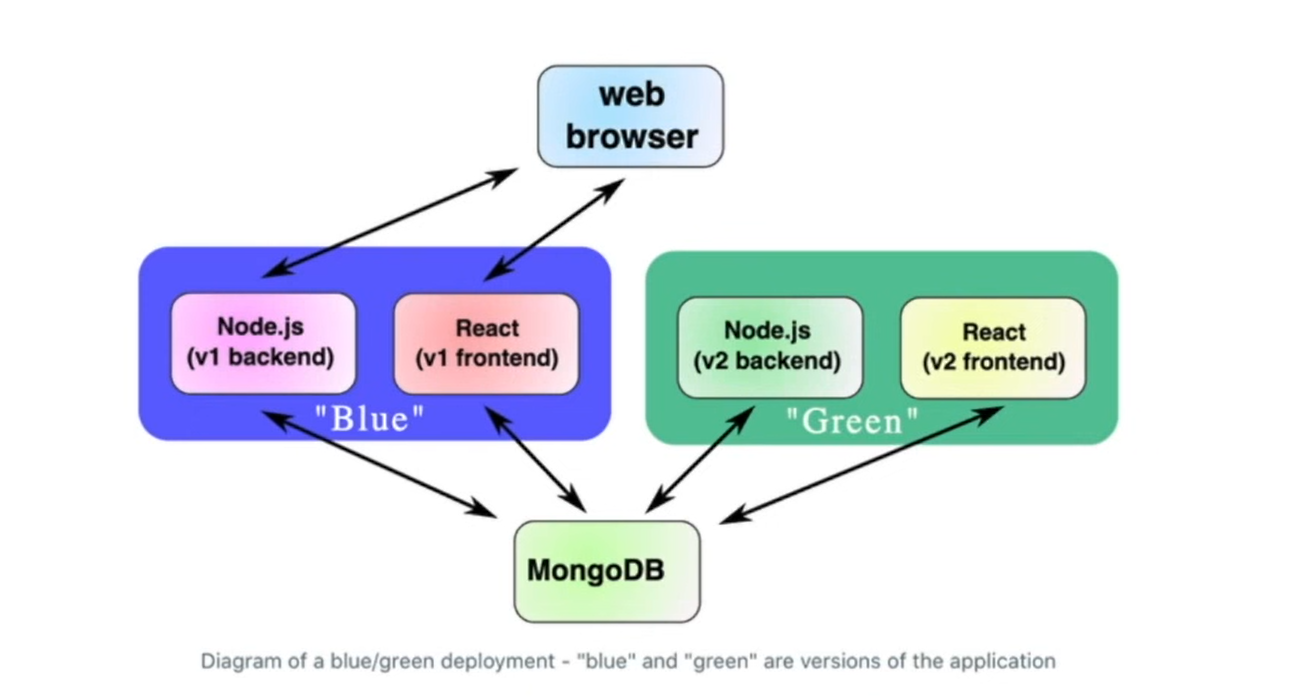
* Strategy to deploy a new version of an application.
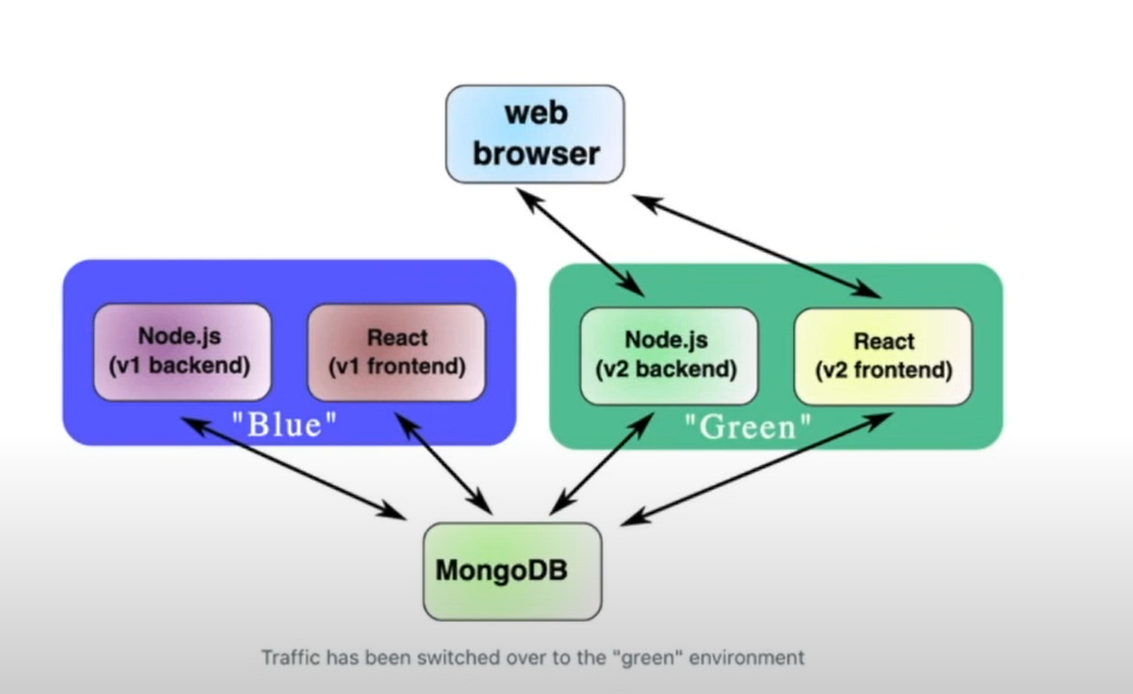
* They work by starting an entirely new instance of the application and then routing traffic over to it
* After testing and making sure that everything runs fine, we redirect the users to the new version (Green) and shutdown the old (Blue)
#### Benefits:
* Easy to understand
* Powerful
* Extendable to workflows
#### Cons:
* Difficutl to make hotfixes
* Resource allocation is not convenient
* Clusters can affect each other
# Canary Deployments
* In the context of blue/green deployments "canary deployments" would be to route around 5% of users at random to the new cluster, and check that those users do not have negative feedback
# What is autoscaling & serverless?
* Autoscaling automates horizontal scaling to ensure that the number of workers is proportional to the load on the system
#### Technologies that allow us to scale this way:
### Serverless vs Autoscaling
* Autoscaling is usually discussed on the timeline of \~1h chunks of work
* If you took the concept of autoscaling and took it to its limit, you'd get serverless
* Serverless: define resources that are quickly started and use them on the timeline of \~100ms
### Use case for serverless:
* Serverless is primarily used for services that are somewhat fast to start and stateless
* You wouldn't run something like a CI run with serverless framework
* BUT you might run something like a webserver or notification service
# What is service discovery?
* A key problem in deployment is getting services to be able to find each-other
* A database might be at 10.1.1.1:6543 while the webserver is at 10.1.1.2:8080
### Level 1 Service Descovery: Baiscs
* Everything is manually configured
{% hint style="warning" %}
You'll know you should start caring about service discovery when you start seeing one of the following:
1. You want "zero downtime deployments" or to use other, more complex deploy strategies
2. You have more than a couple of microservices
3. You are deploying to several environments (dev, staging, prod) and it's getting unwieldy
{% endhint %}
### Lever 2: Service Discovery via hash table
* A straightforward approach: Store the service IPs in a hash table
* The hash table in question in the config is here:
{% hint style="info" %}
In simple term:
* All you need to do is update your frontend to set the keys in the hash table to be the forntend's IP
* Then make the backend do the same for the backend
{% endhint %}
#### Problems with this approach
* It's complex
* It's error prone
* It requires to write custom config files
### Level 3 Service Discovery via DNS
* The idea for DNS is just to map hostnames to IPs. This is the industry standard
* It would be ideal if we could connect to "" from our reverse proxy and having DNS respond with the IP for the correct versions of the frontend
* So instead of the first example where you use the IP
* You would use `mongo` where `mongo` is a key in the key:value pairs
# What is Log Aggregation?
* It's a way of collecting and tagging application logs from many different services into a single dashboard that can easily be searched
### Popular Open Source Option: ELK
#### Logstash:
* Gets all the messages
* Uses each field as a tag (let's say, `time, user, what the user did`
* Does not log the messages but sends them to Elasticsearch
#### Elasticsearch
* Efficient database that logs all the info coming in from Logstash
#### Kibana
* You as the admin would connect to Kibana
* Kibana would query Elasticsearch (the DB)
* You would get the results needed to identify the fault
### How to use ELK to diagnose a PROD problem?
* Report: user saw error code 12345 when he tried to do "x" actions
* With ELK set up, all we have to do is go to Kibana and query recent logs for 12345
* That might give us the name of the service: "backend"
* Then we could narrow down the time to the five second interval around the error and filter for log messages emitted by either the backend or the database
* Finally, we'd read those log messages to find the context for the bug
### Bonus: Add log aggregation as an extra test
* Could be useful to see if there is any error messages coming back from running the stack
```docker
FROM vm/ubuntu:18.04
RUN docker-compose up -d
RUN docker-compose -f elk.yml up -d
RUN docker-compose exec web npm run test
RUN docker-compose exec elasticsearch curl -x GET 'http://localhost:9200/logs/_search
```
### Options of Log Aggregation platforms:
* ELK
* Fluentd
* DataDog
* LogDNA
* AWS CloudWatch Logs
# Metric Monitoring
### Popular Option: Prometheus
### 4 Key components:
* The TSDB (time series database) actually stores the billions of individual measurements of things like page load time
* The "retrieval" section takes data from various places, like parsing them from log messages or measuring how long individual jobs took, and puts them in the database
* The alert manager sends notifications to the relevant people when INCIDENT
* The web UI is primary used to understand the metrics alerted someone has been alerted of a fault
# ChatGPT
# Better prompts for ChatGPT
### Different Arguments
#### Formula:
Can you write an argument \[for/against] \[subject] from multiple diverse perspectives. Before you do so state the characteristics of various characters
#### Example:
Can you write an argument for the use of AI in universities from multiple diverse perspectives. Before you do so state the characteristics of the various characters?
### Email Subjects
#### Formula:
Can you write me \[number] emails subject tiles for \[type of the email] to \[target audience]?
#### Example:
Can you write me 5 email subject titles for a weekly progress update to my entire product developlement team?
### Get ChatGPT to act like an expert you need
#### Formula:
You are a top tier \[ subject expert ] that coaches \[ topic ] on a daily basis on how to grow their business, specifically with \[ topic ]. Now teach me how to \[ topic ] that connects with small business owners within the \[ topic field ]
#### Example:
You are a top tier marketing expert that coaches business owners on a daily basis on how to grow their business, specifically with paid advertising. Now teach me how to crate content that connects with small business owners within the hospitality field
### Get ChatGPT to make a list of Unique ideas
#### Formula:
How to bring new clients into my \[ topic ] that is in the \[ industry name ]
Brainstorm unique and unconventional ideas
Prioritize ideas that are effective and low cost
#### Example:
How to bring new clients into my marketing agency that is in the Industry
Brainstorm unique and unconventional ideas
Prioritize ideas that are effective and low cost
### Getting ChatGPT to vary its output
* Outline
* Midmap
* Bullet points
#### Formula:
Create me a \[ output type ] on the reasons why \[ topic ] is \[good/bad] for you
#### Example:
Create me a bullet point list on the reasons why I should go to sleep early
### You can also ask ChatGPT for better prompts
#### Example:
\
As an AI language model, I am designed to be able to assist with a wide range of prompts and tasks. Some of the best out-of-the-box prompts that can help you get better results from ChatGPT include:
1. "What are the best practices for improving productivity in the workplace?"
2. "What is the most effective way to train a machine learning model?"
3. "How do I optimize my website for search engines?"
4. "What are some effective strategies for managing stress and anxiety?"
5. "What are the latest trends in digital marketing?"
6. "How can I improve my public speaking skills?"
7. "What are some common interview questions and how should I answer them?"
8. "What are the most important factors to consider when choosing a new job?"
9. "How can I improve my financial management skills?"
10. "What are some effective time management strategies?"
# AWS
This section contains various AWS Cloud documentations gathered along the years of learning/working with AWS
# AWS - 40 most common Services
This page includes 40 of the most commonly used Services in AWS with a description of what they do
**VPC:**
* Virtual Private Cloud (VPC) lets you launch AWS resources in a private, isolated cloud.
**Route 53:**
* It's a scalable and highly available DNS and domain name registration service.
**EC2:**
* Amazon Elastic Compute Cloud (EC2) provides resizable compute capacity in the cloud.
**Elastic Beanstalk:**
* AWS Elastic Beanstalk is an application container for deploying and managing applications.
**Lambda:**
* AWS Lambda is a compute service that runs your code in response to events and automatically manages the computing resources.
**EC2 Container Service:**
* Amazon ECS allows you to easily run and manage Docker containers across a cluster of EC2 instances.
**Mobile Hub:**
* AWS Mobile Hub lets you quickly build, test, and monitor the usage of your mobile apps
**Device Farm:**
* Device Farm helps to improve the quality of Android, Fire OS, and iOS apps by testing them against real phones and tablets in the AWS Cloud
**SNS:**
* Simple Notification Service (SNS) lets you publish messages to subscribers or other applications.
**Cognito:**
* Cognito is a simple user identity and data sync. service that helps to securely manage and synchronize app data for your users across their mobile devices.
**Mobile Analytics**:
* Mobile Analytics is a service that lets you easily collect, visualize, and understand app usage data at scale.
**IAM**:
* AWS Identity and Access Management (IAM) lets you securely control access to AWS services and resources.
**Inspector:**
* Amazon Inspector enables you to analyze the behavior of the applications you run in AWS and helps you to identify potential security issues.
**Directory Service**:
* AWS Directory Service provides managed directories in the cloud.
**Certificate Manage**r:
* AWS Certificate Manager lets you easily provision, manage, & deploy SSL/TLS certificates for use with AWS services.
**WAF:**
* Web Application Firewall protects web applications from attack by providing web traffic filtering against common web exploits.
**GameLift**:
* Deploy and scale session-based multiplayer games in the cloud in minutes, with no upfront costs.
**S3:**
* Amazon Simple Storage Service (S3) can be used to store and retrieve any amount of data.
**Import/Export Snowbal**l:
* AWS Import/Export Snowball accelerates moving large amounts of data into and out of AWS using secure appliances for transport.
**Glacier**:
* It is a low-cost storage service that provides secure and durable storage for data archiving and backup.
**Storage Gateway**:
* AWS Storage Gateway securely integrates on-premises IT environments with cloud storage for backup and disaster recovery.
**CloudWatch**:
* Amazon CloudWatch provides monitoring for resources and applications.
**AWS Config**:
* AWS Config gives you an inventory of your AWS resources lets you audit resource configuration history & notifies you when resource configurations change.
**CloudFormation**:
* It lets you create & update a collection of related AWS resources in a predictable fashion.
**API Gateway**:
* Amazon API Gateway makes it easy to create, maintain, monitor, and secure APIs at any scale.
**SQS**:
* Amazon Simple Queue Service (SQS) offers a reliable, highly scalable, hosted queue for storing messages.
**CloudSearch**:
* AWS CloudSearch is a fully managed search service for websites and apps.
**RDS**:
* Amazon Relational Database Service (RDS) makes it easy to set up, operate, and scale familiar relational databases in the cloud.
**ElastiCache**:
* ElastiCache improves application performance by allowing you to retrieve information from an in-memory caching system.
**DynamoDB**:
* DynamoDB is a scalable NoSQL data store that manages distributed replicas of your data for high availability.
**Redshift**:
* It is a fast, fully managed, petabyte-scale data warehouse that makes it cost-effective to analyze all your data using your existing business intelligence tools.
**SES**:
* Amazon Simple Email Service (SES) enables you to send and receive an email.
**CodeCommit:**
* AWS CodeCommit is highly scalable, managed source control service that hosts private Git repositories.
**CodeDeploy**:
* AWS CodeDeploy lets you fully automate code deployments
**AWS IoT:**
* AWS IoT is a managed cloud service that lets connected devices easily and securely interact with cloud applications and other devices.
**Machine Learning:**
* Amazon Machine Learning is a service that enables you to easily build smart applications.
**Data Pipeline:**
* AWS Data Pipeline is a lightweight orchestration service for periodic, data-driven workflows.
**Kinesis:**
* Amazon Kinesis services make it easy to work with real-time streaming data in the AWS cloud.
**WorkSpaces:**
* Amazon WorkSpaces is a fully managed desktop computing service in the cloud.
**WorkMail:**
* Amazon WorkMail is a managed email and calendaring service that offers strong security controls and support for existing desktop and mobile clients.
# AWS CLI Cheatsheet
This page contains a cheat sheet with useful AWS commands
### AWSCLI
#### How to install:
```bash
# Arch Linux:
sudo pacman -S awscli
# Redhat based or Debian based:
curl "https://awscli.amazonaws.com/awscli-exe-linux-x86_64.zip" -o "awscliv2.zip"
unzip awscliv2.zip
sudo ./aws/install
```
#### Or install via PIP
```bash
pip3 install awscli --upgrade --user
```
#### Resources:
* [Install AWS CLI](https://docs.aws.amazon.com/cli/latest/userguide/getting-started-install.html)
#### How to remove:
```bash
sudo rm -rf /usr/local/aws
sudo rm /usr/local/bin/aws
```
#### Check awscli version:
```bash
aws --version
```
### Configure cloud access
```bash
aws configure
```
* Add key
* Add Secret Key
* Add Region
* Add Format
{% hint style="info" %}
The above values can be obtained by using programmatic access (Access keys) via IAM Service
{% endhint %}

### S3 commands
#### How to check Total S3 bucket size:
```bash
aws s3 ls --summarize --human-readable --recursive | grep "Total Size"
```
### Lightsail commands
#### Restart Instance:
```bash
aws lightsail reboot-instance --instance-name
```
#### Stop Instance:
```bash
aws lightsail stop-instance --instance-name
```
#### Start Instance:
```bash
aws lightsail start-instance --instance-name
```
# Account & IAM
# Create AWS Account
1. Go to [https://aws.amazon.com/ ]()
2. Click Create an AWS account
3. Add your email address and press "I am a new user"
4. Add all needed info
5. Click Create Account
6. Add all needed info, also a valid credit card
{% hint style="info" %}
Don't worry, no money will be taken from the account if you stay within the free tier
{% endhint %}
# Lambda
# Create Lambda function for Lightsail
Example of how to create a quick stop/start Lambda function for Lightsail in AWS
1. Add function name
2. Select runtime (in our case python)
3. Create the function
4. Add code to stop/start instance:
#### Code to STOP Lightsail Instance:
```python
# TO STOP
import json
import boto3
def lambda_handler(event, context):
client = boto3.client('lightsail', region_name='REGION-NAME')
response = client.stop_instance(
instanceName='INSTANCE-NAME'
)
return {
'statusCode': 200,
'body': json.dumps('Lambda has stopped instance')
}
```
#### Code to START Lightsail Instance:
```python
# TO START
import json
import boto3
def lambda_handler(event, context):
client = boto3.client('lightsail', region_name='REGION-NAME')
response = client.start_instance(
instanceName='INSTANCE-NAME'
)
return {
'statusCode': 200,
'body': json.dumps('Lambda has started instance')
}t
```
5\. Go to Amazone EventBridge --> Events --> Rules --> Create Rule

6\. Select Scheduled --> Next

7\. Select CRON pattern --> Use `5 2 ? * 7 *` for Every Saturday at 2:05 GMT (Example) --> Next

8\. On the Right side: Select tragets(s) --> AWS Service --> Lambda function --> Select Lambda Function Name

9\. Click Next --> Review --> Next --> Finished
### Resources:
[Time Conversion Romania](https://www.worldtimebuddy.com/gmt-to-romania-bucharest)
[AWS Cron Expressions Documentation](https://docs.aws.amazon.com/AmazonCloudWatch/latest/events/ScheduledEvents.html)
# Route 53
# Set up R53 DNS Entry for GitBook
This guide shows how to set up a custom URL for GitBook using Route53 in AWS
{% hint style="info" %}
**Note:**
You will require to have a domain already registered with AWS in order for this guide to work
{% endhint %}
## GitBook config:
1. Click **Publish**
2. Select either **Public** or **Unlisted**

3\. Click **Confirm**

4\. Click **Link and domain settings**

5\. Click **Connect a domain**

6\. Enter domain or subdomain name:

7\. Copy CNAME "link"
{% hint style="info" %}
This will be needed for the AWS DNS configuration
{% endhint %}

## AWS config:
Go to Route53 --> Hosted Zones --> Click Domain name --> Click Create Record
1. Set up Record Name
2. Select CNAME
3. Insert Github link you've recived earier
4. Click create record

5\. Click Retry in GitBook
{% hint style="info" %}
**Note:**
The DNS CNAME Record could take up to 30 minutes to update and propagate
{% endhint %}
### Resources:
[GitBook configure DNS](https://docs.gitbook.com/hosting/custom-domains/dns-configuration#configure-a-cname-record)
# RDS
# AWS RDS Burst Balance
## What Burst Balance Applies To
* Burst balance only applies to General Purpose SSD storage (gp2). It does not apply to Magnetic storage, or Provisioned IOPS (io1).
### Baseline Performance
* Every SSD comes with a baseline performance, measured in IOPS (I/O (input/output) per second).
* Each GB of storage provides 3 IOPS of baseline performance.
* There is a minimum of 100 IOPS. So any SSD between 20-33 GB will have a baseline performance of 100 IOPS.
* There is a maximum of 16,000 IOPS. So any SSD above 5340 GB will have a baseline performance of 16,000 IOPS.
* Examples: 500 GB has 1,500 IOPS, 1,000 GB has 3,000 IOPS.
* This baseline performance is guaranteed for your SSD. You will have this level of IOPS even if you have no burst balance remaining.
### Burst
* Bursting is having your SSD go over the baseline performance for a certain period of time.
* The burst duration is dependent on the burst balance, which is related to how much it’s gone over the baseline, as well as the size of the SSD.
* SSDs below 1,000 GB are able to burst to a maximum of 3,000 IOPS.
* SSDs that are 1,000 GB and above do not have a maximum IOPS that they can burst to.
* For this, the documentation says that burst is not relevant for SSDs above 1,000 GB. The phrase “not relevant” can be a little vague. Does it mean there’s no burst at all? Or does it mean it can burst to any value? From personal experience, the highest IOPS value I have seen my 1,000 GB SSD burst to is 15,000 IOPS).
### Burst Balance
* When the IOPS usage of your SSD goes above the baseline, burst balance is used.
* When the IOPS usage goes below the baseline, burst balance is regenerated.
* If your burst balance reaches 0%, your SSD will not perform any higher than the baseline IOPS. This can cause severe issues with your application performance if it relies too much on burst.
* I feel that the actual calculations for this aren’t that important to know, because I don’t think you should be planning too much around using the burst balance due to the dangers of hitting 0%. Burst balance should be treated as a safety net, not something to be used regularly
### Resource:
* [NG Wee Thia Joel Blog](https://joelngwt.github.io/2021/08/27/understanding-aws-rds-burst-balance.html)
# VPC
# What is a VPC
VPC = Virtual Privat Cloud
* This is an instance that can be deployed to a region over multiple availability zones
* It kind of acts like a private network that contains multiple subnets
* The great thing about it is that it is private and secure
* The resources can communicate between subnets but they do not communicate outside of the subnet
* To be able to serve the app to the internet (let's say it's a webapp) we can add the private subnets `10.0.1.0/24` and `10.0.4.0/24` to a `internet gateway`
* The now public subnets with the load balancer resources are reachable from the internet but they are still able to communicate with the other subnets in the VPC
#### Simple infrastructure for a basic secure app:
* Create subnet that is connected to a Internet gateway and has something like Nginx deployed to it
* Create another subnet where you would add the webapps
* Create another subnet where you would add the databases
* Note that all the deployed resources communicate with each other
#### So how would traffic go?
* Our internet gateway allows HTTPS connections on port 443 to server `10.0.1.10` which hosts Nginx
Nginx Server --> Forward traffic to webapp --> webapp connects to database, also processes the request and returns data to Nginx --> Nginx servers the result to the end user
# EC2
# Removing EC2 user from sudo list
1. Check the: `/etc/sudoers.d/cloud-init` file
2. If the `ec2-user default user` is there --> delete the file.
# Create a Windows Gaming VPS
This page contains interesting stuff that does not have it's own documentation
* [Create a Windows Gaming VPS on AWS](< https://www.youtube.com/watch?v=H3vP6hD3fRo>)
# Connecting to a AWS EC2 instance
* This is to be followed on how to connect to a AWS EC2 instance using Session Manager
1\. In the top search bar type **EC2**, than click **EC2** in the dropdown

2\. Click on **Instances**

3\. Search for the instance either by Name or Instance ID
4\. Click **Connect**

**5**. Click **Session Manager**, than **Connect**

**6**. This should bring you to a shell where you need to type `sudo bash` after which you will be greeted with the following screen:
You are now connected. Done!
# Azure
# Courses
# AZ900 Course
If you have never had an account you can use the following [link](https://azure.microsoft.com/en-us/free) to sign up
# Overview
***
# Describe Core Concepts
### What is Azure?
* Azure is a cloud computing platform with an ever-expanding set of services to help you build solutions to meet your business goals.
* Azure services range from simple web services for hosting your business presence in the cloud to running fully virtualized computers for you to run your custom software solutions.
* Azure provides a wealth of cloud-based services like `remote storage`, `database hosting` and `centralized account management`
* Azure also offers new capabilities such as `AI` and `IoT`
### What does Azure support?
Azure supports:
* **IaaS** (Infrastructure as a Service)
* **PaaS** (Platform as a Service)
* **SaaS** (Software as a Service)
Preparation for Exam AZ-900
The Azure fundamentals learning path series can help you prepare for Exam `AZ-900: Microsoft Azure Fundamentals`. This exam includes six knowledge domain areas:
| AZ-900 Domain Area | Weight |
| --------------------------------------------------------------- | ------ |
| Describe cloud concepts | 20-25% |
| Describe core Azure services | 15-20% |
| Describe core solutions and management tools on Azure | 10-15% |
| Describe general security and network security features | 10-15% |
| Describe identity, governance, privacy, and compliance features | 20-25% |
| Describe Azure cost management and Service Level Agreements | 10-15% |
{% hint style="info" %}
**Note**: The percentages shown indicate the relative weight of each area on the exam. The higher the percentage, the more questions that part of the exam will contain.
{% endhint %}
### Learning Objectives:
* Describe the basic concepts of cloud computing
* Determine whether Azure is the right solution for your business needs
* Differentiate between the different methods of creating an Azure subscription
### What is cloud computing?
It's the delivery of computing services over the internet, which is otherwise known as the cloud. These services include: `servers`, `storage`, `databases`, `networking`, `software`, `analytics and intelligence`
### Why is cloud computing typically cheaper to use?
Cloud computing is a delivery of computing services over the internet by using a `pay-as-you-go` price model. You typically pay only for the cloud services you use, which helps you:
* Lower your operating costs
* Run your infrastructure more efficiently
* Scale as your business needs change
### Why should you move to the cloud?
The cloud helps you move faster and innovate in ways that were once nearly impossible
In our ever-changing digital world, two trends emerge:
* Teams deliver new features to their users at record speeds
* Users expect an increasingly rich and immersive experience with their devices and with software
To power your services and deliver innovative and novel user experiences more quickly, the cloud provides on-demand access to:
* A nearly limitless pool of `raw compute`, `storage` and `networking components`
* Speech recognition and other cognitive services that help make your application stand out from the crowd
* Analytics services that deliver telemetry data from your software and devices
### How does Azure work?
Azure uses Virtualization on a massive scale.
Each server rack runs a special kind of software called `fabric controller` which communicates through a switch with another special kind a software called an `orchestrator`. The `orchestartor` processes the `API requests` that allow you to deploy anything to the `cloud` through platforms such as the `azure portal` or `azure cli`
### What is the Azure portal?
It is a web-based, unified console that provies an alternative to command-line tools. You can manage your azure subscriptions by using a GUI:
* Build, manage and monitor everything from a simple webapp to complex cloud deployments
* Create custom dashboards for an organized view of resources
* Configure accessibility options for an optimal experience
### What is Azure Marketplace?
`Azure Marketplace` helps connect users with Microsoft Partners, independent software vendors and startups that are offering their solutions and services, which are optimized to run on Azure.
`Azure Marketplace` can find, try, purchase and provision applications and services from hundreds of leading service provides. All solutions and services are certified to run on Azure
The solution catalog spans several industry categories such as:
* open-source container platforms
* virtual machine images
* databases
* application build and deployment software
* developer tools
* threat detection
* blockchain
### Azure Services overview:
Most commonly used categories:
* Compute
* Networking
* Storage
* Mobile
* Databases
* Web
* IoT
* Big Data
* AI
* DevOps
#### Compute:
| Service name | Service function |
| -------------------------------- | ------------------------------------------------------------------------- |
| Azure Virtual Machines | Windows or Linux virtual machines (VMs) hosted in Azure. |
| Azure Virtual Machine Scale Sets | Scaling for Windows or Linux VMs hosted in Azure. |
| Azure Kubernetes Service | Cluster management for VMs that run containerized services. |
| Azure Service Fabric | Distributed systems platform that runs in Azure or on-premises. |
| Azure Batch | Managed service for parallel and high-performance computing applications. |
| Azure Container Instances | Containerized apps run on Azure without provisioning servers or VMs. |
| Azure Functions | An event-driven, serverless compute service. |
#### Networking:
| Service name | Service function |
| ------------------------------ | ------------------------------------------------------------------------------------- |
| Azure Virtual Network | Connects VMs to incoming virtual private network (VPN) connections. |
| Azure Load Balancer | Balances inbound and outbound connections to applications or service endpoints. |
| Azure Application Gateway | Optimizes app server farm delivery while increasing application security. |
| Azure VPN Gateway | Accesses Azure Virtual Networks through high-performance VPN gateways. |
| Azure DNS | Provides ultra-fast DNS responses and ultra-high domain availability. |
| Azure Content Delivery Network | Delivers high-bandwidth content to customers globally. |
| Azure DDoS Protection | Protects Azure-hosted applications from distributed denial of service (DDOS) attacks. |
| Azure Traffic Manager | Distributes network traffic across Azure regions worldwide. |
| Azure ExpressRoute | Connects to Azure over high-bandwidth dedicated secure connections. |
| Azure Network Watcher | Monitors and diagnoses network issues by using scenario-based analysis. |
| Azure Firewall | Implements high-security, high-availability firewall with unlimited scalability. |
| Azure Virtual WAN | Creates a unified wide area network (WAN) that connects local and remote sites. |
#### Storage:
| Service name | Service function |
| ------------------- | ----------------------------------------------------------------------------------------------------------------------------------------------------------------------------------- |
| Azure Blob storage | Storage service for very large objects, such as video files or bitmaps. |
| Azure File storage | File shares that can be accessed and managed like a file server. |
| Azure Queue storage | A data store for queuing and reliably delivering messages between applications. |
| Azure Table storage | Table storage is a service that stores non-relational structured data (also known as structured NoSQL data) in the cloud, providing a key/attribute store with a schemaless design. |
These Services all share several common characteristics:
* `Durable` and highly available with redundancy and replication
* `Secure` through automatic encryption and role-based access control
* `Scalable` with virtually unlimited storage
* `Managed` handling maintenance and any critical problems for you
* `Accessible` from anywhere in the world over `HTTP` or `HTTPS`
#### Mobile:
Devs can create mobile back-end services for `iOS`, `Android` and `Windows` apps quickly and easily
Other features of this service include:
* Offline data sync
* Connectivity to on-premises data
* Broadcasting push notifications
* Auto-scaling to match business needs
#### Databases:
| Service name | Service function |
| ------------------------------------ | ---------------------------------------------------------------------------------------------------- |
| Azure Cosmos DB | Globally distributed database that supports NoSQL options. |
| Azure SQL Database | Fully managed relational database with auto-scale, integral intelligence, and robust security. |
| Azure Database for MySQL | Fully managed and scalable MySQL relational database with high availability and security. |
| Azure Database for PostgreSQL | Fully managed and scalable PostgreSQL relational database with high availability and security. |
| SQL Server on Azure Virtual Machines | Service that hosts enterprise SQL Server apps in the cloud. |
| Azure Synapse Analytics | Fully managed data warehouse with integral security at every level of scale at no extra cost. |
| Azure Database Migration Service | Service that migrates databases to the cloud with no application code changes. |
| Azure Cache for Redis | Fully managed service caches frequently used and static data to reduce data and application latency. |
| Azure Database for MariaDB | Fully managed and scalable MariaDB relational database with high availability and security. |
#### Web
| Service name | Description |
| ------------------------------------- | -------------------------------------------------------------------------- |
| Azure App Service | Quickly create powerful cloud web-based apps. |
| Azure Notification Hubs | Send push notifications to any platform from any back end. |
| Azure API Management | Publish APIs to developers, partners, and employees securely and at scale. |
| Azure Cognitive Search | Deploy this fully managed search as a service. |
| Web Apps feature of Azure App Service | Create and deploy mission-critical web apps at scale. |
| Azure Signal Service | Add real-time web functionalities easily. |
#### IoT
| Service name | Description |
| ------------- | ---------------------------------------------------------------------------------------------------------------------------------------------------------------------------------------------------- |
| IoT Central | Fully managed global IoT software as a service (SaaS) solution that makes it easy to connect, monitor, and manage IoT assets at scale. |
| Azure IoT Hub | Messaging hub that provides secure communications between and monitoring of millions of IoT devices. |
| IoT Edge | Fully managed service that allows data analysis models to be pushed directly onto IoT devices, which allows them to react quickly to state changes without needing to consult cloud-based AI models. |
#### Big Data
Data comes in all formats and sizes. When we talk about big data, we're referring to large volumes of data. Data from weather systems, communications systems, genomic research, imaging platforms, and many other scenarios generate hundreds of gigabytes of data. This amount of data makes it hard to analyze and make decisions. It's often so large that traditional forms of processing and analysis are no longer appropriate.
Open-source cluster technologies have been developed to deal with these large data sets. Azure supports a broad range of technologies and services to provide big data and analytic solutions.
| Service name | Description |
| ----------------------- | ------------------------------------------------------------------------------------------------------------------------------------------------------------------------------------------------ |
| Azure Synapse Analytics | Run analytics at a massive scale by using a cloud-based enterprise data warehouse that takes advantage of massively parallel processing to run complex queries quickly across petabytes of data. |
| Azure HDInsight | Process massive amounts of data with managed clusters of Hadoop clusters in the cloud. |
| Azure Databricks | Integrate this collaborative Apache Spark-based analytics service with other big data services in Azure. |
#### AI
| Service name | Description |
| ------------------------------ | ------------------------------------------------------------------------------------------------------------------------------------------------------------------------------------------------------------------------------------------------------------- |
| Azure Machine Learning Service | Cloud-based environment you can use to develop, train, test, deploy, manage, and track machine learning models. It can auto-generate a model and auto-tune it for you. It will let you start training on your local machine, and then scale out to the cloud. |
| Azure ML Studio | Collaborative visual workspace where you can build, test, and deploy machine learning solutions by using prebuilt machine learning algorithms and data-handling modules. |
A closely related set of products are the cognitive services. You can use these prebuilt APIs in your applications to solve complex problems.
| Service name | Description |
| --------------------------- | ---------------------------------------------------------------------------------------------------------------------------------------- |
| Vision | Use image-processing algorithms to smartly identify, caption, index, and moderate your pictures and videos. |
| Speech | Convert spoken audio into text, use voice for verification, or add speaker recognition to your app. |
| Knowledge mapping | Map complex information and data to solve tasks such as intelligent recommendations and semantic search. |
| Bing Search | Add Bing Search APIs to your apps and harness the ability to comb billions of webpages, images, videos, and news with a single API call. |
| Natural Language processing | Allow your apps to process natural language with prebuilt scripts, evaluate sentiment, and learn how to recognize what users want. |
#### DevOps
DevOps brings together `people`, `processes`, and `technology` by `automating software delivery` to provide `continuous value` to your users. With Azure DevOps, you can create build and release pipelines that provide `continuous integration`, `delivery`, and `deployment` for your `applications`. You can `integrate repositories` and `application tests`, `perform application monitoring`, and work with `build artifacts`
| Service name | Description |
| ------------------ | --------------------------------------------------------------------------------------------------------------------------------------------------------------------------------------------------------------------------------------- |
| Azure DevOps | Use development collaboration tools such as high-performance pipelines, free private Git repositories, configurable Kanban boards, and extensive automated and cloud-based load testing. Formerly known as Visual Studio Team Services. |
| Azure DevTest Labs | Quickly create on-demand Windows and Linux environments to test or demo applications directly from deployment pipelines. |
### Get started with Azure account
To create and use Azure Services you need an Azure subscription.
After you've created an Azure account, you're free to create additional subscriptions.
* For example, your company might use a single Azure account for your business and separate subscriptions for `development`, `marketing`, and `sales` departments.
***
### What is the Azure free account?
The Azure free account includes:
* Free access to popular Azure products for 12 months.
* A credit to spend for the first 30 days.
* Access to more than 25 products that are always free.
The Azure free account is an excellent way for new users to get started and explore. To sign up, you need a phone number, a credit card, and a Microsoft or GitHub account. The credit card information is used for identity verification only. You won't be charged for any services until you upgrade to a paid subscription.
***
### What is the Learn sandbox?
* Many of the Learn exercises use a technology called the sandbox, which creates a temporary subscription that's added to your Azure account.
* This temporary subscription allows you to create Azure resources for the duration of a Learn module.
* Learn automatically cleans up the temporary resources for you after you've completed the module.
* When you're completing a Learn module, you're welcome to use your personal subscription to complete the exercises in a module.
* The sandbox is the preferred method to use though, because it allows you to create and test Azure resources at no cost to you.
***
# Cloud Models (IaaS, PaaS, SaaS)
### What are cloud service Models?
`IaaS - Infrastructure as a Service:` This cloud service model is the closest to managing physical servers; a cloud provider will keep the hardware up-to-date, but operating system maintenance and network configuration is up to you as the cloud tenant.
For example, `Azure virtual machines` are fully operational virtual compute devices running in Microsoft data centers. An advantage of this cloud service model is rapid deployment of new compute devices. Setting up a new virtual machine is considerably faster than procuring, installing, and configuring a physical server.
`PaaS - Platform as a Service:` This cloud service model is a managed hosting environment. The cloud provider manages the virtual machines and networking resources, and the cloud tenant deploys their applications into the managed hosting environment.
For example, `Azure App Services` provides a managed hosting environment where developers can upload their web applications, without having to worry about the physical hardware and software requirements.
`SaaS - Software as a Service:` In this cloud service model, the cloud provider manages all aspects of the application environment, such as virtual machines, networking resources, data storage, and applications. The cloud tenant only needs to provide their data to the application managed by the cloud provider.
For example, `Microsoft Office 365` provides a fully working version of Microsoft Office that runs in the cloud. All you need to do is create your content, and Office 365 takes care of everything else.
***
The following illustration demonstrates the services that might run in each of the cloud service models:

***
### IaaS
IaaS is the most flexible category of cloud services. It aims to give you complete control over the hardware that runs your application. Instead of buying hardware, with `IaaS`, you rent it.
#### Advantages:
* `No CapEx`. Users have no up-front costs.
* `Agility`. Applications can be made accessible quickly, and de-provisioned whenever needed.
* `Management`. The shared responsibility model applies; the `user manages and maintains the services they have provisioned`, and `the cloud provider manages and maintains the cloud infrastructure`.
* `Consumption-based model`. Organizations pay only for what they use and operate under an Operational Expenditure (OpEx) model.
* `Skills`. No deep technical skills are required to deploy, use, and gain the benefits of a public cloud. Organizations can use the skills and expertise of the cloud provider to ensure workloads are secure, safe, and highly available.
* `Cloud benefits`. Organizations can use the skills and expertise of the cloud provider to ensure workloads are made secure and highly available.
* `Flexibility`. IaaS is the most flexible cloud service because you have control to configure and manage the hardware running your application.
***
### PaaS
PaaS provides the same benefits and considerations as IaaS, but there are some additional benefits to be aware of.
#### Advantages:
* `No CapEx`. Users have no up-front costs.
* `Agility`. PaaS is more agile than IaaS, and users don't need to configure servers for running applications.
* `Consumption-based model`. Users pay only for what they use, and operate under an OpEx model.
* `Skills`. No deep technical skills are required to deploy, use, and gain the benefits of PaaS.
* `Cloud benefits`. Users can take advantage of the skills and expertise of the cloud provider to ensure that their workloads are made secure and highly available. In addition, users can gain access to more cutting-edge development tools. They can then apply these tools across an application's lifecycle.
* `Productivity`. Users can focus on application development only, because the cloud provider handles all platform management. Working with distributed teams as services is easier because the platform is accessed over the internet. You can make the platform available globally more easily.
#### Disadvantage
* `Platform limitations`. There can be some limitations to a cloud platform that might affect how an application runs. When you're evaluating which PaaS platform is best suited for a workload, be sure to consider any limitations in this area.
***
### SaaS
SaaS is software that's centrally hosted and managed for you and your users or customers. Usually one version of the application is used for all customers, and it's licensed through a monthly or annual subscription.
SaaS provides the same benefits as IaaS, but again there are some additional benefits to be aware of too.
#### Advantages:
* `No CapEx`. Users have no up-front costs.
* `Agility`. Users can provide staff with access to the latest software quickly and easily.
* `Pay-as-you-go pricing model`. Users pay for the software they use on a subscription model, typically monthly or yearly, regardless of how much they use the software.
* `Skills`. No deep technical skills are required to deploy, use, and gain the benefits of SaaS.
* `Flexibility`. Users can access the same application data from anywhere.
#### Disadvantage:
* `Software limitations`. There can be some limitations to a software application that might affect how users work. Because you're using as-is software, you don't have direct control of features. When you're evaluating which SaaS platform is best suited for a workload, be sure to consider any business needs and software limitations.
***
Cloud service model comparison
| IaaS | PaaS | SaaS |
| ---------------------------------------------------------- | ---------------------------------------------------- | ----------------------------------------------------------- |
| The most flexible cloud service | Focus on application development | Pay-as-you-go pricing model |
| You configure and manage the hardware for your application | Platform management is handled by the cloud provider | Users pay for the software they use on a subscription model |
* **The following chart illustrates the various levels of responsibility between a cloud provider and a cloud tenant:**

### What is serverless computing
Like PaaS, serverless computing enables developers to build applications faster by eliminating the need for them to manage infrastructure. With serverless applications, the cloud service provider automatically provisions, scales, and manages the infrastructure required to run the code. Serverless architectures are highly scalable and event-driven, only using resources when a specific function or trigger occurs.
It's important to note that servers are still running the code. The "serverless" name comes from the fact that the tasks associated with infrastructure provisioning and management are invisible to the developer. This approach enables developers to increase their focus on the business logic, and deliver more value to the core of the business. Serverless computing helps teams increase their productivity and bring products to market faster, and it allows organizations to better optimize resources and stay focused on innovation.
# Benefits of Cloud Computing
## Benefits of Cloud Computing
### Describe Cloud Concepts (20%-25%)
#### Identify the benefits and considerations of using cloud services
* identify the benefits of cloud computing such as HA, Scalability, Elasticity
* identify the differences between `Capital Expenditure` (CapEx) and `Operational Expenditure` (OpEx)
* describe the consumption-based model
#### Describe the differences between categories of cloud services
* describe the `shared responsibility model`
* describe `Infrastructure-as-a-Service` (IaaS)
* describe `Platform-as-a-Service` (PaaS)
* describe `Software-as-a-Service` (SaaS)
* describe `serverless computing`
* identify a service type based on use case
#### Describe the differences between types of cloud computing
* define cloud computing
* describe `Public cloud`
* describe `Private cloud`
* describe `Hybrid cloud`
* compate and contrast the three types of cloud computing
## Cost Benefits and Scaling
* Cost Savings - both real and accounting
* Agility
* Availability
* Security
* Global reach
* Range of ready on-demand services
* Range of tools
### Cost Savings - Real
* Economies of Scale
* Total cost of ownership (TCO) - electricity, internet, cooling, employees
* MSFT can run a server cheaper than anyone else with a few exceptions
* 4 vCPU server - as low as $187/mo
#### You can take actions to reduce your costs - i.e Autoscaling
### Global Reach
* It's not practical/possible for most businesses to run data centers in multiple countries
* Allows you to expand your applications to other regions of the world
* Reduced latency & Availability benefits
***
### High Availability
* Usually expressed as a percentage, it's the ability of a system to respond to users
`Example: 99.99% (4 nines) = 4 minutes per month downtime`
***
### Scalability
* The ability of a system to handle growth of users or work
***
### Elasticity
* The ability of a system to automatically grow and shrink based on application demand
## Agility Benefits and Accounting
### Agility
* The ability to change rapidly based on changes to market or environment
Most development servers are less then $1.00
***
### Disaster Recovery
* The ability of a system to recover from failure within a period of time, and how much data is lost
This is usually automatic, you are able to migrate your environment to another region
***
### Capital Expenditure (CapEx) and Operational Expenditure (OpEx)
* `CapEx` is money invested in assets (like computers) that return investments over time
* `CapEx` is the upfront money that you pay to hopefully bring a higher ROI
* `OpEx` is money spent every day on operation expenses
***
### Consumption-Based Model
* Pay per minute
* Pay per hour
* Pay per execution
* Pay per CPU utilization
***
# Cloud Models and Cloud Types
# Overview of Cloud Models
## Infrastructure-as-a-Service (IaaS)
* Virtual Machine, networking, loadbalancers, firewalls
* Pieces of hardware that are virtualized in the cloud
## Platform-as-a-Service (PaaS)
* Upload code packages and have them run, without access to the hardware
* You're not managing the RAM, CPU, Disk space.
* Basically "Hey here is my program, please run it"
## Software-as-a-Service (SaaS)
* Access to configuration only
* Think webapps such as Dropbox, Google Drive, Office 365
## Shared Responsibility Model

#### Always your Responsibility:
* Information and data
* Devices (PC and Mobile)
* Accounts and identities
# IaaS, PaaS, SaaS
## "Something" as a Service
* The idea is that you don't own that thing
* Someone lese owns it and you benefit from it - "as a service"
* You're not in control of how it's delivered (for the most part)
* Pay as you go; no upfront costs
**Example**: Cooking at home --> Cooking as a Service (Restaurant) Driving your own car --> Driving as a Service (Taxi)
## Software as a Service (SaaS)
* You `don't control` the servers (or even know what they are)
* You `don't control` the software (or even know what version number is running)
* You `control` the data and settings only
**It stands alone as a useful product; does not require something else to be useful**
**Example**: Microsoft Office 365 - SaaS Sharepoint, Outlook, Word, Excel, etc...
## Platform as a Service (PaaS)
* You `don't control` the servers (but you might be able to pay more for performance)
* You `control` the data and settings
* Often it's programmable and you can upload your own code
* Provides useful features above the raw storage or compute underneath
**It's a platform that you need to build upon to be useful**
**Example**: App Service - PaaS Azure SQL Database - PaaS
## Infrastructure as a Service (IaaS)
* You `do control` the VM
* It's a virtual imitation of a real piece of a network
* Falls into 3 categories:
* Compute
* Networking
* Storage
**Completely "dumb" unless you control it**
**Example**: Virtual Machines - IaaS Azure Storage - IaaS Load Balancer - IaaS
***
# The Serverless Model
**IaaS, PaaS, SaaS are not the only models that can be run in the Cloud**
## The Serverless Model
* There are still servers...
* You just don't ever have to deal with them
* Even less access to the servers than PaaS
{% hint style="info" %}
*PaaS Notes:*
* *Even with PaaS, you have to choose an App Service Plan*
* *Within PaaS, scaling is your responsibilit*
{% endhint %}
**Serverless means not worrying about choosing the right plan** **Serverless means bit worrying about scaling** **Serverless means you might pay $0 if you don't use the service (since you are paying for execution)**
## Azure Serverless Offers:
* Compute:
* Azure Functions
* Serverless Kubernetes (Virtual Nodes w/ ACI)
* Database:
* Azure SQL Database Serverless
* Cosmos DB Serverless
# Cloud Types
## Public cloud
* Azure owns the hardware on their network and infrastructure
* Open for everyone to sign up
* Renting services
## Private cloud
* Looks and acts like a cloud except the customer owns or leases or has exclusive access to the hardware
* Azure Stack - Software that is licensed to use a portal on your own private cloud
## Hybrid cloud
* Combination of public and private clouds
* Scale private infrastructure to the cloud
## Compare and Contrast:
#### Public cloud:
* MSFT owns the hardware and you are leasing services
#### Private cloud:
* Your hardware, more like a traditional on-prem build
#### Hybrid cloud:
* It's a mix between the two
***
# Core Azure Architectural Components
# Overview
## Describe the core Azure Architectural components
* describe the benefits and usage of `Regions and Region Pairs`
* describe the benefits and usage of `Availability Zones`
* describe the benefits and usage of `Resource Groups`
* describe the benefits and usage of `Subscriptions`
* describe the benefits and usage of `Management Groups`
* describe the benefits and usage of `Azure Resource Manager`
* explain Azure resources
## Describe code resources available in Azure
* describe the benefits and usage of:
* Virtual Machines
* Azure App Service
* Azure Container Instances (ACI)
* Azure Kubernetes Service (AKS)
* Windows Virtual Desktop
* describe the benefits and usage of:
* Virtual Networks
* VPN Gateway
* Virtual Network peering
* Express Route
* describe the benefits and usage of:
* Container (Blob) Storage
* Disk Storage
* File Storage
* Storage tiers
* describe the benefits and usage of:
* Cosmos DB
* Azure SQL Database
* Azure Database for MySQL
* Azure Database for PostgrSQL
* SQL Managed Instance
* describe the benefits and usage of `Azure Marketplace`
# Regions & Availability Zones
## Regions
Split in more then +60 Regions: (Not all regions are available for everyone)

{% hint style="info" %}
Some Regions do have some normal access to them like China. The China region is run by a different Chinese company and in order to be able to access it you would need to have an agreement with that company.
{% endhint %}
## Region Pairs
### What are Paired Regions?
* Each region has one other region which is treated as it's "pair"
* Almost always in the same geography - data storage laws
* The data connection between region pairs is the highest speed available
* Software rollouts are deployed to one region of a pair and the other is not touched
* if multiple regions go down, one region of each pair is treated as a priority
### Example Pairs
**Canada:** Canada Central - Canada East
**Europe:** North Europe - West Europe
**USA:** East US - West US
**USA:** East US2 - Central US
**USA:** North Central US - South Central US
**Brazil:** Brazil South - South Central US
***
## Availability Zones

**Regions are broken up further into Availability Zones** You can choose to which Availability Zone in the Region you want to deploy too.
**Each Availability Zone is separated from each other running on it's own power, cooling and network**
* So if there are issues with power or other similar stuff it's likely only to affect one of the Availability Zones but not the other/others
# Resource Groups & Subscriptions & Management Groups
## Resource Groups
Basically like a file structure for the Resources on Azure:

* They are logical groupings of related things:
* This could be by project
* Individual people who work on that group
***
## Subscription
**Subscription is a billing unit**
* You can create multiple Subscriptions
* As a User you have access to more subscriptions with different roles
* All resources consumed by a subscription will be billed to the owner and has to be specified.
* Can be used to organize resource into completely distinct accounts
* You can use the same credit card to organize into different subscriptions
Example:

* Each Department has it's own Subscription
* Above that you have an account (which is a user) which is the global Administrator
## Management Groups
**Management Groups can be nested, meaning that you can have management groups containing management groups**

# Resources & Resource Manager
## Azure Resource Manager (ARM)
**You can interact with the Azure Cloud in multiple ways, but under the hood is handled the same. This is the Azure Resource Manager API**
{% hint style="info" %}
The API can handle all your resource management in Azure but there are also situations where it can run on your resources as well.
{% endhint %}
## Azure Resources
**Instance of services that you create that are yours to use**
# Core Resources available
# Compute Resources
## Getting Deep into the Technical:
* Compute Services
* Networking Services
* Storage Services
* Database Services
* Azure Marketplace
## Compute services covered:
* Virtual Machines (VM)
* App Services (Web apps)
* Azure Container Instances (ACI)
* Azure Kubernetes Services (AKS)
* Windows Virtual Desktop
### What is Compute?
**Compute:** "Executing code" in the cloud
## Virtual Machines:
* `Infrastructure as a Service - IaaS`
* Take an existing machine from your environment into the cloud - a copy
* Windows or Linux OS - several of each
* A "slice" of a physical machine shared with other customers
* Full control over it, as if it was your machine
### Virtual Machine Types
Over 200 to choose from
Examples:
* Number of CPU cores
* CPU speed
* RAM size
* temporary disk size
* IOPS
* etc...
## App Services:
* `Platform as a service (PaaS)`
* A new paradigm for running code in the cloud
* Give your code and configuration to Azure and they will run it
* Promise of performance but no access to hardware
## Containers:
* Another paradigm for running code in the cloud
* Containers contain everything the app needs to run in a "container image"
* Fastest and easiest to deploy
* Azure Container Instance (ACI) - Single instance, quickest way to deploy a container
* Azure Kubernetes Service (AKS) - Runs on a cluster of servers, enterprise-grade
## Windows Virtual Desktop
* Desktop version of Windows that runs in the cloud
* Your software installed, your files - available form anywhere
* Can even see your desktop on IOS and Android from any web browser
* Runs on Azure
# Networking Resources
## Networking Services Covered:
* Virtual Networks
* VPN Gateway
* VPnet Peering
* ExpressRoute
## Types of Networking Services:
* Connectivity Services
* Protection Services
* Delivery Services
* Monitoring Services
## Connectivity:
**Virtual Network:** Emulating a physical network Microsoft Global Network already exists so a virtual network is just software configuration
**Virtual Private Network (VPN):** connecting two networks as if they were on the same network, uses a Network Gateway
**ExpressRoute:** high-speed private connection to Azure
## Protection - Security:
**DDos Protection:** Distributed denial of Service attack protection
**Azure Firewall**
**Network Security Groups:** - Access control list
**Private Link**
## Delivery - Not on the Exam:
**Load Balancer:** distribute traffic evenly between multiple backend servers
**Application Gateway:** a higher-level of loadbalancer with an optional firewall
**Content Delivery Network (CDN):** stores common static files on the edge, closer to the users for (percived) improved performance
**Azure Front Door Service:** a load balancer, CDN and firewall all-in-one
## Monitoring - Management Tools:
**Network Watcher**
**ExpressRoute Monitor**
**Azure Monitor**
# Storage Resources
## Storage Services Covered:
* Container (Blob) Storage (Like folders)
* Unstructured data to be stored and accessed at a massive scale in block
* Example: Needed for an application to support steaming
* Disk Storage
* Ability to persistently store and access data from an attached virtual hard disk
* Storing data that is not required to be accessed from outside the virtual machine
* File Storage
* Offers fully managed cloud file shares that you can access from anywhere
* Storing development tools needed to be accessed from many virtual machines
* Table Storage
* The ability to store structured NoSQL data in the cloud providing a key/attribute store with a schema-less design
* Example: Storing varying datasets such as user profile data
* Storage Tiers
**Storage - one of the foundational technologies on which much is built**
## Container (Blob) & File Storage:
* The `Azure Storage` Account
* General Purpose v2 (gpv2) is the most common type
* Blobs
* Tables
* Queues
* Files
* Azure Data Lake Storage Gen2
* Cheapest type of storage
* Pay Per GB (\~1.8 Cents per GB)
## Many, Many Options:
* Access tiers
* Hot
* Cold
* Archive (More like cold storage, but cheaper and costs more and takes longer to access files)
* Performance tiers - Standard or Premium
* Location (Impacts the pricing)
* Redundancy / Replication (Backup of the file in another region)
* Fail-over Options
## Disk Storage:
* Azure Virtual Machine Disks
* Managed Disks (If you use all of it or none of it, you pay the same)
* Reserve capacity in advanced (Pay for reservation)
* Optimized to virtual hard disks
# Database Services
## Database Services Covered:
* Cosmos DB
* Azure SQL Database
* Azure Database for MySQL
* Azure Database for PostgreSQL
* SQL Managed Instance
**Most sophisticated applications have some type of database**
## Cosmos DB
* Extremely fast storage
* Designed for modern application such as mobile video games, social networks and things requiring thousands of global replication
* NoSQL Storage
* Multi-modal
* Supports many open-source APIs and protocols
## Azure SQL Database
* Runs on the SQL Server engine underneath
* Relational DB
* Database as a Service
* Easy to replicate
* Easy to scale
* Easy to migrate from SQL Server on-prem
## Azure Database for MySQL
* Managed MySQL database
* Common open-source DB
* Makes migration to the cloud easier if you rely on this one
* Wordpress uses it
## Azure Database for PostgreSQL
* Managed PostgreSQL database
* Open-source DB
* Has better support for clusters and more complex server setups
* Makes migration to the cloud easier if you rely on this one
## SQL Managed Instance
* Most compatible with existing SQL Server
* Minimal code changes
* Fully managed by Azure
* Always up-to-date
# Azure Marketplace
**Is where MSFT and it's various partners list their varier computing services available for your use**
* Can create a custom image from your preferred setup and that's the image you can deploy
* Can search of Database that are not default
# Azure Core Solutions
# Overview
## Describe core solutions and management Tools (10-15%)
## Describe core solutions available in Azure:
* Describe the benefits and usage of:
* Internet of Things (IoT) Hub
* IoT Central
* Azure Sphere
* Describe the benefits and usage of:
* Azure Synapse Analytics
* HDInsight
* Azure Databricks
* Describe the benefits and usage of:
* Azure Machine Learning
* Cognitive Services
* Azure Bot Service
* Describe the benefits and usage of:
* serverless computing solutions that include Azure Functions and Logic Apps
* Describe the benefits and usage of:
* Azure DevOps
* GitHub
* GitHub Actions
* Azure DevTest Labs
## Describe Azure management tools:
* Describe the functionality and usage of:
* Azure Portal
* Azure PowerShell
* Azure CLI
* Cloud Shell
* Azure Mobile App
* Describe the functionality and usage of Azure Advisor
* Describe the functionality and usage of Azure Resource Manager (ARM) templates
* Describe the functionality and usage of Azure Monitor
* Describe the functionality and usage of Azure Service Health
# Internet of Things (IoT) Solutions
## Internet of Things (IoT)
* IoT Hub
* IoT Central
* Azure Sphere
## Azure Sphere
* A platform designed to work with connected devices
### Includes:
* a secure, silicon chip
* Sphere OS
* Cloud-based security services
# Big Data Solutions
## Big Data and Analytics
* Azure Synapse Analytics (Formerly SQL Data Warehouse)
* Is designed to pull massive amounts of data
* Someone came with the idea to pull all reporting data to it's own database
* Can be done over night or at other timeframes
* Can be expanded to includ other datasources
* Open Source version of this (Apache Hadoop - MSFT offeres managed services)
* HDInsight (Managed services of Open Source products)
* Apache Storm
* Apache Kafka
* Apache Spark
* Apache Hadoop
* Apache HBase
* Apache Interactive Query
* Azure Databricks
* Open Source Project
* Data Analytics Platform
* All users working in one workspace to make sense of the Data (using Jupyter Notebooks)
* Real time Reporting & Hand Made notes
# AI Solutions
## Artificial Intelligence (AI)
* Azure Machine Learning
* Cognitive Services
* Azure Bot Service
## A variety of API to be called
* Vision
* Translation
* Language
* Decision making APIs
* etc...
## Azure Bot Service
* A natural language chatbot service
* A database of frequently-asked questions
* A front-end that allows people to ask questions and get answers
# Azure Functions & Logic Apps and Event Grid
## Serverless
* Azure Functions
* Logic Apps
* Event grid
**Note:** There are servers but they are hidden from you. These are configurable but not programmable
## Azure functions:
* 1 MILLION function executions per month are free
* Used for small code deployment where you don't require a server to run this
* Fast and easy to set up
* Can be really cheap
* Different payment plans
## Azure Logic Apps:
* Logic apps are a Workflow service:
* Example:
* Step 1: do this
* Step 2: do that
* Step 3: ?
* Step 4: profit
* Can use if/else statements or if this then that...
* First time you do this it will redirect you in the "Logic Apps Designer"
* Charged on number of Executions as well
# DevOps Solutions
## DevOps Solutions:
* Azure DevOps
* GitHub
* GitHub Actions
* Azure DevTest Labs
`DevOps = Developers + Operations`
Tools for:
* Kanban
* CI/CD
* Versioning of code
## Github
* MSFT bought Github in 2018
* The most popular place to store your company's source code
* has private and public options
* Integrates with tools such as Visual Studio
* Based on the "git" source control language invented by Linus Torvalds of Linux fame
## Github Actions
* Automate sofware workfolws
* What happens once someone "checks in" changes to code?
* Compiles and deploys to dev environment
* Possibly includes Continuous Integration (CI)
* Possibly includes automatic compilation of code to check for errors
* Possibly includes running a suite of tests againt code
`Having a Web App automatically update when new code is checked in`
# Azure Management Tools
# Overview
## Azure Tools:
* Azure CLI
* PowerShell
* Azure Portal
* Azure Cloud Shell
* Azure Mobile App
## Azure Mobile App
* Monitor the health & status of resources from your phone
* Run commands
* start servers
* stop servers
* restart servers
## Azure Advisor
* Run and Analyze your actual usage of Azure and make recomandations on how to improve
* It does this accross 5 areas:
* Cost
* Security
* Reliablility
* Operational excellence
* Performace
* Free Service and running against everyone's different account
# Managing Azure with ARM Templates
## Azure Resource Manager (ARM)
* The deployment and management service for Azure
* Management layer that allows you to create, update and delete resources called "deployments"
* All actions that you take to manage your Azure resources goes through the ARM

## ARM Templates
* What they are actually creating are something called ARM Templates
* Written in JSON/JavaScript object type language
* Format that a computer can understand
* Infrastructure as Code (IaC)
* Change template, redeploy, new server with new code up and running
# Azure Monitor & Azure Service Health
## Azure Monitor
* Centralized dashboard for **most** of your Azure Resources

* Generally free but you pay for storage

## Azure Service Health
* How do you know if Azure itself has issues?
* Shows issues of Azure world wide
* Can see history of Incidents
* RCA - Root cause analysis report
* Can be added to your dashboard
# Azure Security Features
# Overview
## Describe General and Network features (10-15%)
## Describe Azure Security features:
* Describe basic features of:
* Azure Security Center (including policy compliance)
* security alerts
* secure score
* resource hygiene
* Describe the functionality and usage of `Key Vault`
* Describe the functionality and usage of `Azure Sentinel`
* Describe the functionality and usage of `Azure Dedicated Hosts`
## Describe Azure network security
* Describe the concept of defense in depth
* Describe the functionality and usage of `Network Security Groups (NSG)`
* Describe the functionality and usage of `Azure Firewall`
* Describe the functionality and usage of `Azure DDoS protection`
# Azure Security Center
## Azure Security Center:
**Unified infrastructure security management system that monitors and protects your systems inside and outside of Azure**
* Strenghten security
* Protects against threats
* Get secure faster
# Azure Key Vault & Azure Sentinel
## Azure Key Vault
**Central, secure repository for your secrets, certificates and keys**
Who has access?
* You
* you grant access to the program to use that particular secret
What else?
* Can generate public & private keys
* Does support SSL Certificates, Client certs, etc
## Azure Sentinel:
* Centralizes all the log files from various resources
* Analyzes them to detect threats
* Allows you to run queries on those logs yourself
* Investigate an incident
* Orchestration and automation to fix the issues
# Azure Dedicated Hosts
## Azure Dedicated Hosts
**Hardware that is dedicated to you and only you**
You can reserve a virtual machine and run multiple virtual machines on it (to the machine limit)
# Azure Network Security
# Network Security Group (NGS), Firewall and DDoS Protection
## Defense in Depth
Concept is to enforce security through all the layers of your application
## Security Layers
* `Data` - i.e virtual network endpoint
* `Application` - i.e API Management
* `Compute` - i.e Limit Remote Desktop access, Windows Update
* `Network` - i.e NSG, use of subnets, deny by default
* `Perimeter` - i.e DDoS, Firewalls
* `Identity & access` - i.e Azure AD
* `Physical` - i.e Door locks and key cards
## Network Security Group (NGS)

* Basically a collection of ports that are allowed
* NGS is a very simplistic set of rules
* When used right you can turn of a lot of access
* Denly by default
## Azure Firewall

* Is more of an intelligent device that will analyze traffic that comes in
* Will analyze certain bad patterns
* Example: Block SQL Injection attacks and XSS attacks
## Azure DDoS Protection

# Azure Identity Services
# Overview
## Describe Identity, Governance, Privacy and Compliance Features (20-25%)
## Describe core Azure Identity Services
* Explain the difference between authentication and authorization
* Define Azure Active Directory
* Describe the functionality and usage of Azure Active Directory
* Describe the functionality and usage of Conditional Access, Multi-Factor Authentication (MFA) and Single Sign-On (SSO)
## Describe Azure governance features
* Describe the functionality and usage of Role-Based Access Control (RBAC)
* Describe the functionality and usage of resource locks
* Describe the functionality and usage of tags
* Describe the functionality and usage of Azure Policy
* Describe the functionality and usage of Azure Blueprints
* Describe the Cloud Adoption Framework for Azure
## Describe privacy and compliance resources
* Describe the Microsoft core tenets of Security, Privacy and Compliance
* Describe the purpose of the Microsoft Privacy Statement, Online Service Terms (OST) and Data Protection Amendment (DPA)
* Describe the purpose of the Trust Center
* Describe the purpose of the Azure compliance documentation
* Describe the purpose of Azure Sovereign Regions (Azure Government cloud services and Azure China cloud Services)
## Identity
* In computing "identity" is a representation of a person, application or device
Examples of Identity:
* John Henry Doe
*
* Monthly Payroll Application
* The laser printer at 6th Floor West
Usually requires a password, secret key or a certificate to prove that you are who you say you are
Many Applications require you to log in to use some of its functionality
## How it's traditionally handled
Client App/Web Browser/Mobile App --> USER ID, PASSWORD --> Server/Web Site --> DB
* Traditionally, companies have written their own code to handle this
* Some of the more famous "hacks" have been on custom created identity systems
**Hacks:**
* were storing passwords in plain text
* were using a simple, reversible hash algorithm (MD5)
* were storing the salt along with the data
* not enforcing password change policies
* not enforcing password complexity policies
#### Azure provides an identity management system based on their popular "Active Directory"
## Azure Active Directory (Azure AD or AAD)
* It's not the same as Active Directory
* Traditional AD does not work with Internet Protocols (LDAP = does not work on internet)
* Azure AD provides "identity as a service"
* Instead of having to write code to handle users, passwords, passwords reset you have a middleman
* Open Standards that work over internet: (SAML, OpenID, WS Federation)
# Benefits
## Benefits of Azure Active Directory
* High Security
* Reduce development time, easier support
* More features
* Centlazired Administration
* Only one user ID and Password = Single Sign-on (SSO)
* Integration with Azure Services
# Multi-Factor Authentication (MFA)
## Multi-Factor Authentication (MFA)
* Requires 2 or more pieces of evidence (factors) in order to prove who you are
* Three Factors:
* **Something you know** - i.e Password
* **Something you have** - i.e mobile phone, access to email account
* **Something you are** - i.e fingerprint
{% hint style="info" %}
Your unique password could be 1 piece of evidence
{% endhint %}
But a second piece of evidence is required - a unique, time-limited code sent to you:
* SMS
* Authentificator app
* Phone call
* Email
# Authentication vs Authorization
## The difference between Authentication and Authorization
* **Authentication** is a user proving who they are - **user id and password**
* **Authorization** is ensuring that a **user is permitted to perform an action**
*Move away from all authenticated users having admin access*
## Azure Active Directory
* Microsoft's preferred solution for identity management
* Powers other Microsoft Services:
* Azure
* Skype
* Outlook
* OneDrive
* Xbox
* Office 365 - Teams, SharePoint, PowerBI, etc
* Complete solution for managing users, groups, roles
* Single-sign on - Synchronization with your corporate AD
* Conditional access:
* Detect unusual activity
* Examples:
* User A attempts to log in to the app from within the company office
* User B attempts to log in to the app for the first time in 4 months
* Administrator C attempts to log in to the app from their phone
* Administrator D attempts to log in to the app from a location 1200km from the office
* You can treat some access attempts as "routine", and some as "not normal"
* Signal --> Decision --> Enforcement
# Azure Governance Features
# Authentification and RBAC
## Role-Based access control (RBAC)
* Microsoft's preferred solution for access control
* Create roles that represent the common tasks of the job:
* Accountant
* Developer
* Business Lead
* Assign granular permissions to that role
* Assign users to that role:
* Do not assign granular permissions to an individual
* Permissions:
* Reader - Can see but cannot modify
* Contributor - Pretty much full access
* Owner - Like contributor but also allowed to grant access
# Resource Locks
## Locks
* READ ONLY - Can not delete
* Protects them from accidents
* Using RBAC, you can restrict who has access to locks
## Resource Tags
* Can add metadata to resources
* Helps with billing and support issues
* Tag to get charged for the Marketing Budget
* Tag to get charged to the Accounting Budget
* Name & Contact info for the owner of the resources
# Azure Policy
## Governance
* Create rules across all your Azure resources
* Evaluate compliance to those rules
* Examples of Built-In Policies:
* Require SQL Server 12.0
* Allowed Storage Account SKUs
* Allowed Locations
* Allowed Virtual Machine SKUs
* Apply tag and its default value
* Not allowed resource types
* Can create custom policies using JSON definition
# Azure Blueprints
## Azure Blueprints:
* Azure subscription templates with Roles and Policies already defined
# Cloud Adoption Framework (CAF)
## Cloud Adoption Framework (CAF)
* Set of documentation guidance, tools
* Best practices for succeeding in the cloud

# Compliance Features
# Core tenets of Security, Privacy and Compliance
## Core Tenets of Security, Privacy and Compliance
## Azure: Trusted Cloud
* Security
* Privacy
* Compliance
* Resiliency
* Intellectual Property (IP) protection
## Security
* Azure is built with security in mind
* Azure delivers tools and technologies to help organizations protect applications and data
* Azure uses encryption
* Azure offers advanced tools to detect and defend against security threats
## Privacy
* You own all your data in Azure
* MSFT will not mine your data or use it for marketing
* You control where the data is located and who has access
* You can access your own data at any time for any reason
* MSFT follows a specific policy for government and law enforcement request
* MSFT follows a specific policy to remove data if you discontinue using their service
## Compliance
* MSFT follows international standards and helps customers to follow those standards too if they wish
* Azure has more then 90 compliance certifications
* Azure follows more then 50 regional standards
* Azure can help with standards in more then 35 industries like health care, government, finance, etc
## Reliability and Resiliency
* High availability
* Disaster recovery
* Backup
## Protecting IP
* You can build your solutions on top of Azure's products and services
* Azure offers specific protections against frivolous infringement claims
* `Azure IP Advantage and Shared Innovation Initiative`
# Privacy Statement and Online Service Terms (OST)
## [Site](https://privacy.microsoft.com)
* Published ways in which they use your data
## Online Services Terms:
* This is our contract with you
* This is what we are promising
* This is what you are getting
## Data Protection Addendum (DPA)
* How they handle your data
* How they store it
* How long before it gets hard deleted
# Trust Center
## Trust center
* This place where a lot of documentation is
* Contained within this:
* Azure compliance
* Privacy statement
* Transparency
* Azure Government
* Azure Industries
* Contains Compliance terms such as GDPR, ISO and NIST
* Portal for all legal documentations
* Many different standards for technology across the world
* MSFT claims to be in compliance with many of them
* Has tools to help you be compliant
## General Data Protection Regulation (GDPR)
* GDPR is a new set of rules designed to give EU citizens more control over their personal data
* Affects companies outside the EU that handle EU citizen's data
* Data has to be collected legally under strict conditions
* Data has to be protected from misuse
* Reporting obligations if data is mishandled
## ISO - International Organization for Standardization
## NIST Cybersecurity Framework (CSF)
* Whole page in the trust center
# Azure Sovereign Regions
## Azure Sovereign Regions
* Separate account to access these regions
* For US government agencies - federal, state and local (does not run on same hardware as general pubilcs portal)
* Department of Defense has its own region too
* Isolated data centers separated from the Azure public cloud
* Meets standards specific to government
* portal.azure.us
* Different URLs for connecting to storage, functions, etc...
## Azure China
* Independent company
* Data remains in China
* Separate accounts
# Manage Azure Costs
# Overview
## Describe Azure cost management and Service Level Agreements (10-15%)
## Describe methods for planning and managing costs
* Identify factors that can affect costs (resource types, services, locations, ingress and egress traffic)
* Identify factors that can costs (reserved instances, reserved capacity, hybrid use benefit, spot pricing)
* Describe the functionality and usage of the Pricing calculator and Total Cost of Ownership (TCO) calculator
* Describe the functionality and usage of Azure Cost Management
## Describe Azure Service Level Agreements (SLAs) and service lifecycle
* Describe the purpose of Azure Service Level Agreements (SLA)
* Identify factors that can impact an SLA (i.e Availability Zones)
* Describe the service lifecycle in Azure (Public Preview and General Availability)
## Factors affecting costs
* Different services are billed based on different factors
## Free Services
* Resource groups
* Virtual networks (up to 50)
* Load balancer (basic)
* Azure Active Directory (basic)
* Network security groups
* Free-tier web apps (up to 10)
## Metered services
* Tracking time
* Tracking GB
* Number of executions
* Tracking traffic
## Pay per usage model (consumption model)
## Opportunity for cost savings
* Azure functions:
* 1 million executions free per month
* $0.20 per million executions
* Cheapest virtual machine is $20 per month
## Pay per usage Services:
* Functions
* Logic Apps
* Storage (pay per GB)
* Outbound bandwidth
* Cognitive Services API
## Pay for time (per second):
* Per second billing means billing stops when the VM is stopped
* You are also paying for storage even tho the VM is stopped
## Stability in pricing
* Pay a fixed price per month for computing power or storage capacity
* Whether you use it or not
* Discounts for 1-year or 3-year commitment in VM (Reserved instances)
* Multi-tenant or isolated environment
## Pay for Bandwidth
* First 5 GB is free
* Inbound data is free (Data coming into Azure)
* 1 PB of data transferred = $52.000
# Best practices
## How do you reduce the cost?
* Azure advisor cost tab is a good place to start
* Auto shutdown on dev/qa resources
* Utilize cool/archive storage where possible
* Reserved instances
* Configure alerts when billing exceeds an expected level
* Use policy yo restrict access to certain expensive resources
* Auto scaling resources
* Downsize when resources over-provisioned
* Ensure every resource has an owner (tags)
* Spot Pricing - Ability to use VM when nobody is using it for a discounted price, but when someone pays in full you get kicked of
# Pricing calculator
## Azure Pricing Calculator
* Estimate your future bill
* Estimates are hard to make 100% accurate
* Export and share the estimate - become a link
## Configurable Options:
* Regions
* Tier
* Subscription Type
* Support Options
* Dev/Test Pricing
## Total Cost of Ownership Calculator (TCO)
* The cost of a server is more than just the cost of the hardware
* Other costs:
* Electricity
* Cooling
* Internet connectivity
* Rack space
* Setup labor
* Maintenance labor
* Backup
* Estimates how much would it cost to run it in a real physical environment
# Azure Cost Management
## Azure Cost Management:
* Historical cost
* Free tool inside Azure to analyze spending
* Analyze spending over time
* Tracking against budgets
* Schedule reports
# SLA (Service level Agreements)
## Service Level Agreement (SLA)
* VM SLA: [click here](https://www.azure.cn/en-us/support/sla/virtual-machines/)
## Azure Service Lifecycle
### Preview features
* are for testing and not production use
* no SLA
* Could change significantly before it goes live
* May not go live
### 2 Types of Preview features:
* Public
* Private
Public preview available to everyone Private preview requires registration
### General Availability (GA)
# Virtual Machines
---
[Next Page](https://docs.arkannis.net/llms-full.txt/1)