> For the complete documentation index, see [llms.txt](https://docs.arkannis.net/llms.txt). Markdown versions of documentation pages are available by appending `.md` to page URLs; this page is available as [Markdown](https://docs.arkannis.net/programming/python/frameworks/fastapi/oauth2-passwordrequestform.md).
# OAuth2 PasswordRequestForm
We should update or appication so that it uses the OAuth2PasswordRequestForm
* First we need to import it
```python
from fastapi.security.oauth2 import OAuth2PasswordRequestForm
```
* Then we need to update our `login` route
```python
# Before:
@router.post('/login')
def login(user_credentials: schemas.UserLogin, db: Session = Depends(database.get_db)):
user = db.query(models.User).filter(models.User.email == user_credentials.email).first()
if not user:
raise HTTPException(status_code=status.HTTP_404_NOT_FOUND, detail=f"Invalid Credentials")
if not utils.verify(user_credentials.password, user.password):
raise HTTPException(status_code=status.HTTP_404_NOT_FOUND, detail=f"Invalid Credentials")
# After:
@router.post('/login')
# We're setting up a dependency with OAuth2PasswordRequestForm
def login(user_credentials: OAuth2PasswordRequestForm = Depends(), db: Session = Depends(database.get_db)):
# We need to make a small change as this form that we are using to get user crenetials stores the email in a varialbe called username
# {
# "username": "something"
# "password": "somepass"
# }
user = db.query(models.User).filter(models.User.email == user_credentials.username).first()
if not user:
raise HTTPException(status_code=status.HTTP_404_NOT_FOUND, detail=f"Invalid Credentials")
if not utils.verify(user_credentials.password, user.password):
raise HTTPException(status_code=status.HTTP_404_NOT_FOUND, detail=f"Invalid Credentials")
```
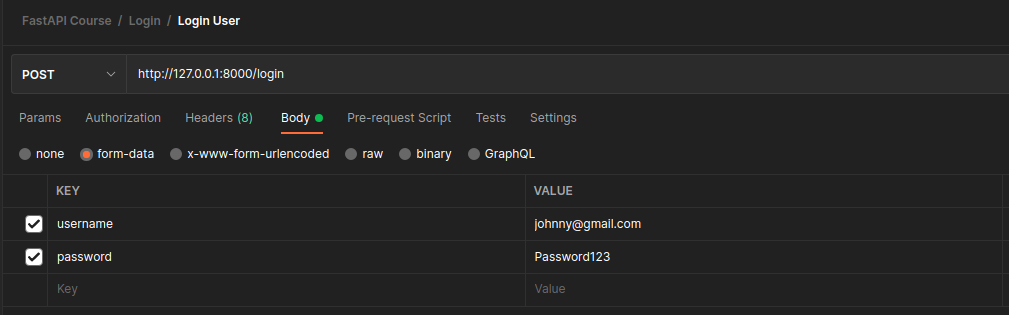
* Now that we have updated this with the OAuth2PasswordRequestForm, we no longer send the details in the body of the HTTP Request
* If we do we will get the following error:
```json
{
"detail": [
{
"loc": [
"body",
"username"
],
"msg": "field required",
"type": "value_error.missing"
},
{
"loc": [
"body",
"password"
],
"msg": "field required",
"type": "value_error.missing"
}
]
}
```
* The values now are expected in the `form-data` section
* This will return the following data:
```json
{
"access_token": "eyJhbGciOiJIUzI1NiIsInR5cCI6IkpXVCJ9.eyJ1c2VyX2lkIjoxLCJleHAiOjE2NjIxMTgyMTJ9.KOlnBfmWsu938veeymniWgRiDNdHhXt7xzRirQLw_VQ",
"token_type": "bearer"
}
```